
Download BillOut – bill organizer, bill tracker, bill management, personal finance, budget planning, expense tracker, financial planning, due date reminder, shared bills, calendar view, dark mode, backup and restore
Overview
BillOut – Bill Organizer is a dedicated Android application designed to simplify the management of recurring and one-time financial obligations. The software enables users to track all their bills in a centralized digital space, helping prevent missed payments and supporting better financial discipline. It is particularly useful for individuals managing personal expenses, shared household costs with flatmates or family, and those aiming to maintain a structured budgeting routine.
The app’s core functionality revolves around bill tracking, due date reminders, and financial visualization through calendar integration and weekly summaries. It caters to consumers seeking a streamlined way to organize their finances without relying on spreadsheets or paper records. The developer, BillOut, has positioned the app as a practical tool for daily financial oversight.
While no additional information about the company’s background is available, the app’s design and feature set suggest a focus on usability and accessibility. Real-world usage scenarios include tracking rent, utility bills, subscriptions, shared grocery costs, and loan repayments. The app supports a variety of payment frequencies, including daily, weekly, monthly, and custom intervals, making it adaptable to diverse financial habits.
Key Features & Capabilities
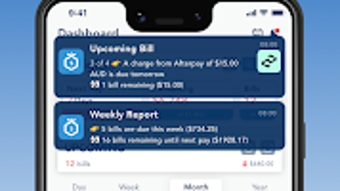
- Bills Tracking & Due Date Reminders: Users can create and monitor bills with customizable due dates. The app sends timely notifications up to three days before the due date, helping users stay proactive.
- Shared Bill Management: Allows users to split bills among multiple people, assigning individual amounts and tracking contributions.
- Budget Planning Tool: Provides a visual overview of total bill amounts between two pay periods, aiding in long-term financial forecasting.
- Calendar View Interface: Displays upcoming bills in a clean, intuitive calendar layout for quick visual assessment.
- Flexible Payment Frequencies: Supports one-off, daily, weekly, monthly, and custom billing cycles to accommodate varied financial obligations.
- Weekly Report Feature: Delivers a summary of upcoming bills every Monday, offering a weekly financial check-in.
- Dark Mode Option: Offers a dark theme for improved readability and reduced eye strain in low-light environments.
- Backup and Restore: Enables users to securely back up their data and restore it across devices, ensuring continuity of financial records.
These features collectively support efficient financial oversight, especially for users managing multiple recurring payments. The ability to assign personalized shares in shared bills is ideal for roommates or families. The calendar view enhances situational awareness, while the weekly report reinforces routine financial review. Backup functionality ensures data resilience, a critical aspect for any personal finance tool.
User Interface, Workflow & Performance
BillOut features a clean, user-friendly interface optimized for mobile use. Navigation is straightforward, with a main dashboard displaying upcoming bills, quick-add buttons, and access to settings. The calendar view provides a clear visual representation of due dates, allowing users to scan their financial commitments at a glance.
Workflow efficiency is enhanced by the app’s intuitive design, which minimizes steps for creating, editing, and marking bills as paid. Users can customize notification preferences directly within the app, choosing the timing and method of alerts. The app’s performance is consistent with typical Android applications of its category.
No specific performance metrics were provided, and resource usage details such as CPU or RAM consumption were not disclosed. General software behavior suggests stable operation under normal conditions, though actual performance may vary based on device specifications. The developer did not specify any known stability issues or crashes.
The app’s responsiveness appears to align with standard mobile app expectations, with minimal lag during navigation and data entry.
Compatibility & System Requirements
BillOut is designed for Android devices and is compatible with the operating system as of version 2.3.0. The application has a file size of 32.2 MB, indicating a lightweight footprint suitable for most Android smartphones and tablets. The developer did not provide detailed system requirements, including minimum Android version, RAM, or storage recommendations.
As such, exact compatibility information is limited. Users should ensure their device meets the standard requirements for running Android applications, including sufficient storage space for installation and operation. The app does not support other platforms such as iOS, Windows, or macOS.
Installation is straightforward, with no reported dependency issues. Compatibility with older or newer Android versions remains unconfirmed, and users are advised to check their device’s compatibility before downloading.
Pros and Cons
Pros
- Centralized bill tracking with visual calendar view
- Support for shared bills with customizable splits
- Customizable due date reminders up to three days in advance
- Weekly financial report for consistent budgeting
- Dark mode for improved nighttime usability
- Backup and restore functionality for data safety
- Lightweight installation at 32.2 MB
- Simple onboarding with one-click sign-up
Cons
- Available only on Android, no support for other platforms
- Exact system requirements not specified by the developer
- Price of $1.99 may be considered high for a single-purpose tool
- No information on cloud sync or cross-device access beyond backup
- Performance details such as battery or memory usage were not provided
FAQ Section
Is BillOut available for iOS or Windows?
BillOut is currently only available for Android devices. There is no official version for iOS, Windows, or macOS.
Is the app secure and does it protect my financial data?
The app includes backup and restore functionality, which suggests data protection measures. However, specific security protocols such as encryption or authentication methods were not disclosed.
How often does the app update?
The latest version available is 2.3.0, released on July 10, 2023. No information on update frequency or release schedule is provided.
What type of license does BillOut use?
BillOut is a one-time purchase app priced at $1.99. It does not appear to be subscription-based, though the developer did not specify the exact license type.
Can I use BillOut offline?
Yes, the app can be used offline after initial setup. Users can create and manage bills without an internet connection. However, backup and restore features require an active connection.
Final Thoughts + CTA
BillOut – Bill Organizer offers a focused and practical solution for individuals seeking to manage their financial obligations efficiently. With its clean interface, robust bill tracking, and shared bill functionality, it stands out as a reliable tool for personal finance organization. The inclusion of a calendar view, customizable reminders, and a weekly report enhances its utility for proactive budgeting.
While the app is limited to Android and lacks detailed system specifications, its lightweight size and core features deliver strong value for users who prioritize financial discipline. The one-time purchase model provides access without recurring fees. For anyone looking to stay on top of bills, avoid late payments, and maintain financial clarity, BillOut is a well-designed choice.
Download BillOut now and take control of your financial schedule with confidence.







